


The secret to making 3D CAD models the sole data source in the workflow
Release time:
2025-06-05 11:43
Source:
Introduction
In today's design and manufacturing industries, 3D CAD models have become an indispensable and important information carrier. To maximize the utility of these models in workflows, we must carefully consider how to create, manage, and display PMI (Product Manufacturing Information) on 3D models.
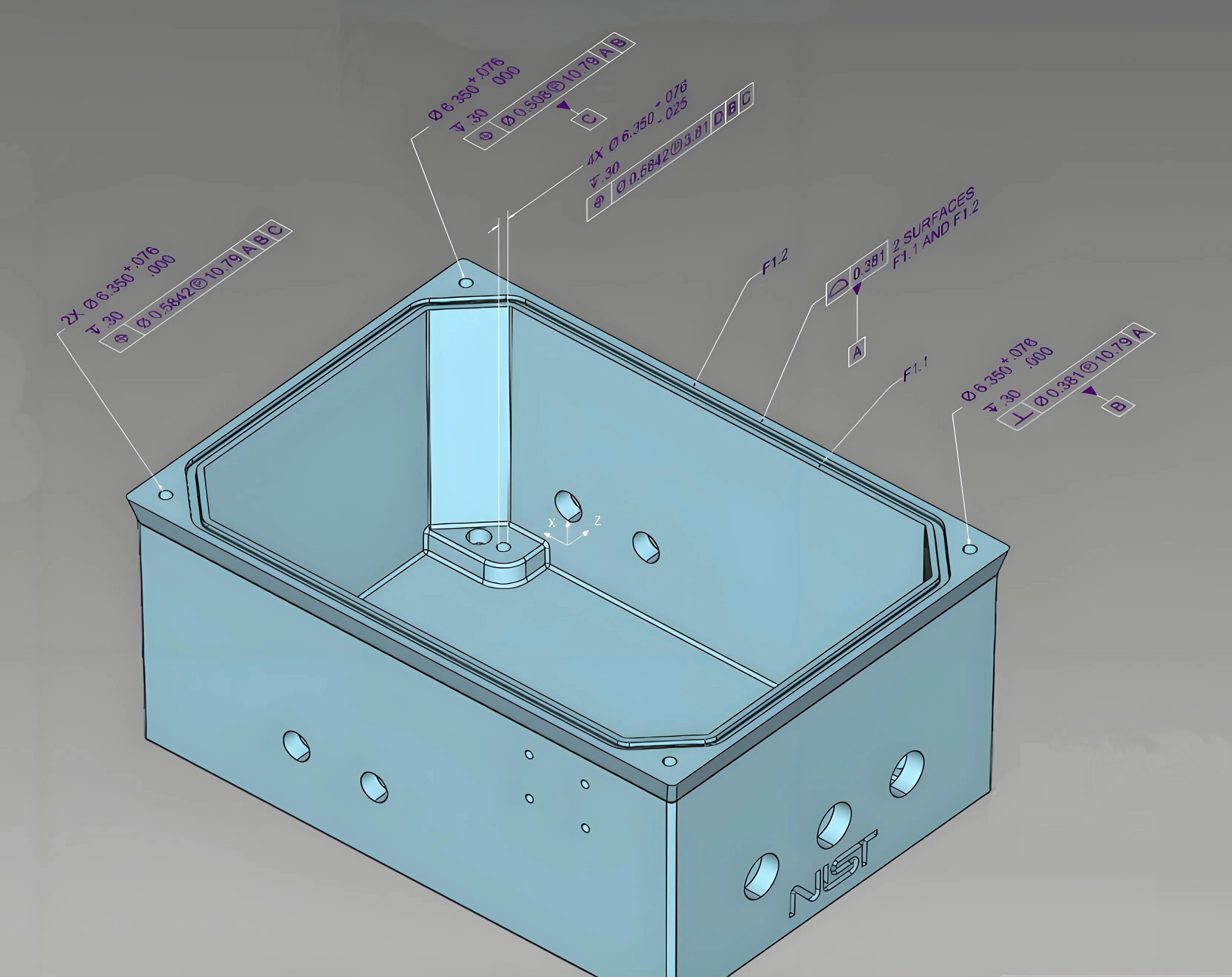
What is PMI?
PMI, simply put, is the key information attached to a 3D model, such as dimensions, tolerances, and materials. This information not only helps engineers and designers better understand the product but also ensures accuracy during the production process. In other words, PMI is like the "manual" for the 3D model—it's essential!
The Importance of Creating, Managing, and Displaying PMI on 3D Models
In workflows, for a 3D model to serve as the single source of data, it is first necessary to ensure the accuracy and accessibility of PMI. Whether it is drawings, documents, or data sheets, everything must revolve around this 3D model. This way, information confusion is avoided, reducing the possibility of errors.
How to Create PMI on 3D Models?
The process of creating PMI is actually not complicated. With modern CAD software, designers can directly add dimension annotations and tolerance information within the model. For example, using annotation tools, it is easy to add length, width, height, and other information to specific parts. Oh! Don't forget, you can also include material specifications and surface treatment requirements, making the PMI information more complete.
How to Manage and Display PMI?
Managing PMI is like tending a small garden; it requires both care and patience. Designers need to regularly check and update PMI information to ensure it matches the actual situation. Additionally, using 3D viewing tools makes it convenient to display PMI information, allowing team members to clearly see it during design reviews. In this way, everyone can collaborate on the same platform, avoiding the creation of information silos.
How to Ensure the 3D Model Becomes the Single Source of Data?
To make the 3D model the single source of data, it is first necessary to establish clear processes within the team. Version control systems can be used to ensure every member has access to the latest model and PMI information. Moreover, regular training and communication are essential to ensure everyone understands how to use these tools and information. This not only improves team collaboration efficiency but also greatly reduces the occurrence of errors.
Summary
In summary, creating, managing, and displaying PMI on 3D models not only improves work efficiency but also ensures information accuracy. Through reasonable processes and tools, we can truly make 3D CAD models the single source of data in workflows, enabling a steadier and farther journey in design and manufacturing.
Create, manage, and display PMI on 3D models,MBD Workflow,3D PMI